Most businesses searching for a mobile attendance app have already seen the feature lists and sat through the demos. The decision stalls anyway. Not from a lack of options, but from too many options promising too many things with no clear way to tell them apart.
Meanwhile, every week without an automated system is another cycle of manual corrections, contested check-ins, and payroll discrepancies that quietly accumulate. The cost is rarely visible on a single invoice. It shows up in HR hours, management time, and payroll rework.
This is not a glossary of features. It is a structured breakdown of what separates a mobile attendance system that works in your operation from one that looks impressive in a demo. By the end, you will know exactly what to look for, what to test, and what questions to ask before committing.
30%
reduction in HR processing time with mobile attendance adoption
Source: MiHCM
Where most businesses are right now
If you manage a team across multiple locations or run shift-based operations in retail, hospitality, construction, or healthcare, your current setup likely has at least 1 of these friction points:
- Employees marking attendance on behalf of absent colleagues
- No reliable way to verify that a field employee actually reached the site
- Payroll spending hours each cycle reconciling attendance discrepancies manually
- Owners or HR managers with no real-time view of who is present across locations
- Employees unable to see their own attendance or leave balance without asking HR
None of this is a technology problem at its core. It is a visibility problem. And mobile attendance systems exist precisely to close that gap.
"The right mobile attendance app does not just record when people arrive. It gives owners and managers a live picture of their workforce, from anywhere, at any time."
What a modern mobile attendance system actually does
The phrase "mobile attendance app" covers a wide spectrum. At the basic end, it replaces a paper register. At the sophisticated end, it integrates face verification, GPS location, payroll sync, leave management, and real-time reporting into a single platform accessible from any Android or iPhone. Here is what each meaningful feature looks like in practice.
📍
Geo-fenced punch in
Employees can only check in when physically within a defined location boundary. No location, no clock in. Remote check-ins that never happened become structurally impossible.
🤳
Face verification
The app captures a selfie at the moment of check-in and matches it against the registered employee profile. Buddy punching is eliminated at the verification layer.
👁️
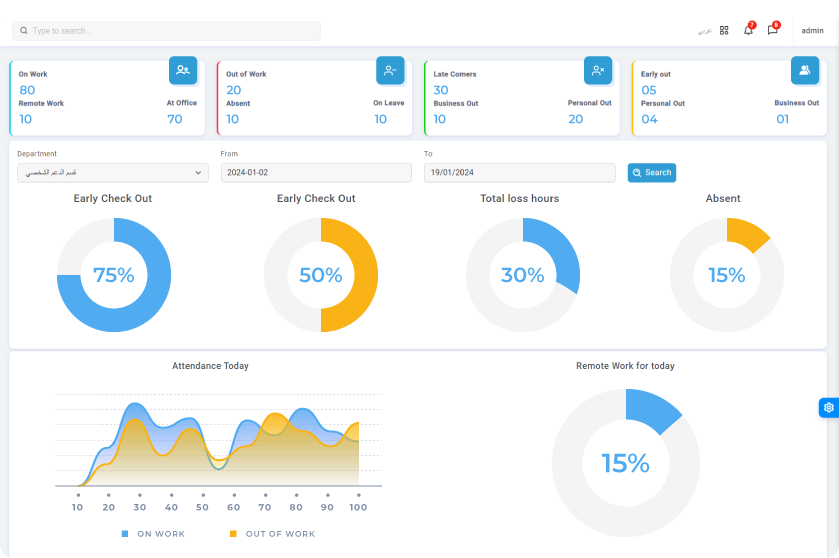
Real-time owner dashboard
Managers see a live view of present, absent, and late employees across every branch or site, updated as events happen, from a single mobile screen.
📋
Employee self-service
Employees view their own attendance records, apply for regularization, check leave balances, and access payslips directly on the app. HR inquiry volume drops sharply.
🔄
Payroll integration
Attendance data flows directly into payroll calculations. Overtime, absences, and late arrivals are computed automatically without manual entry between systems.
📊
Attendance regularization
Employees submit missed punch corrections with face logs and location evidence attached. Managers approve with a full audit trail preserved for compliance.
Biometric attendance machine vs mobile attendance app: the real comparison
This is one of the most searched questions in the category, and the answer matters more than most vendors will admit upfront.
| Factor |
Biometric machine |
Mobile app |
| Setup cost |
Hardware per location, installation fees |
App download, no hardware required |
| Multi-site coverage |
1 device per location minimum |
All locations through 1 cloud account |
| Field and remote staff |
Not applicable, device-bound |
Works anywhere with GPS verification |
| Fraud prevention |
Thumbprint on shared device |
Face recognition plus live location per employee |
| Real-time owner view |
Depends on network and central server |
Live dashboard, always accessible |
| Employee self-service |
Not available on device |
Full access to records, payslips, and requests |
| Scalability |
Hardware cost scales with headcount |
Software seats, predictable per-user pricing |
Thumbprint and biometric machines serve a clear purpose in high-security environments with fixed locations. For businesses with distributed teams, retail outlets, hospitality shifts, or any mobile workforce, a mobile attendance system delivers broader coverage at a fraction of the infrastructure cost.
Worth knowing
Many organizations run both. A biometric device handles the head office while the mobile app covers field staff, satellite locations, and remote workers. The most capable platforms support both inputs from a single dashboard without duplication.
Real-time attendance view for owners and managers
This feature often appears last in vendor brochures but it is the first thing decision-makers ask about in practice. You should be able to open your phone at any moment and see who is present, who is late, who is absent, and what the pattern looks like across your locations, without calling anyone or downloading a report.
When evaluating any mobile time and attendance system, ask for a live demo of the owner view. Test these 4 things specifically:
- Does the dashboard update in real time or does it refresh on a delay?
- Can you filter by branch, department, or shift from the mobile view directly?
- Are late arrivals and early departures flagged automatically, not manually?
- Can you drill to a specific employee and see their photo, location, and check-in time together in 1 view?
If any of those require navigating to a desktop report, the system is built for retrospective data, not operational visibility.
"Owners should not need to ask who came in today. The answer should already be on their screen."
How geo-fencing actually works in a mobile attendance app
Geo-fencing is the feature most businesses mention when searching for mobile attendance solutions for field employees or retail workers. Understanding how it is implemented will tell you a lot about the quality of the platform overall.
When an employee attempts to check in, the app captures their GPS coordinates at that exact moment and checks whether those coordinates fall within a pre-defined virtual boundary around the permitted location. If they are outside it, the check-in is blocked or flagged depending on your configuration.
A well-built geo-fencing attendance app lets you:
- Set multiple geo-fenced zones for different sites from the same admin panel
- Define the radius per location, tighter for office buildings and broader for construction sites
- Allow approved exceptions when genuine field variation occurs, with manager sign-off
- Review a map view of where each employee actually checked in, not just whether they did
Industry-specific considerations
Mobile time and attendance for hospitality
Hospitality operations run on rotating shifts, split shifts, and last-minute schedule changes. The mobile attendance platform needs to support shift-based check-ins, late-night timestamps, and multiple properties under 1 account. The reporting layer should show shift adherence and flag unplanned overtime before payroll runs, not after.
Mobile attendance for retail workers
Retail attendance management sits at the intersection of multiple locations, part-time contracts, and high staff turnover. The right system lets store managers see attendance across all outlets in real time, allows employees to check in from the shop floor rather than a terminal, and feeds directly into weekly payroll without manual consolidation across sites.
Mobile attendance app in the UAE
For businesses operating in the UAE, a mobile attendance app must handle WPS-aligned payroll data, support multi-language interfaces where needed, and maintain audit trails that comply with local labour regulations. Solutions built for the UAE market understand that leave structures, gratuity calculations, and overtime rules differ meaningfully from global defaults.
If you are still weighing whether a dedicated time and attendance platform is the right move, or whether attendance management can be folded into existing HR tools, the complete breakdown of time and attendance software covers exactly that decision, including what most buyers overlook during evaluation.
What happens when the decision is delayed
Every month without an automated mobile attendance system produces a predictable set of costs. They are rarely dramatic. They accumulate quietly.
HR spends between 4 and 6 hours each payroll cycle reconciling attendance discrepancies manually. Over a year, that is between 50 and 75 hours of skilled time spent on data cleanup rather than people strategy. According to G2's payroll research, the average company makes 15 errors per payroll period, and 53% of companies have incurred payroll penalties in the last 5 years directly linked to compliance failures.
Managers who cannot see real-time attendance make staffing decisions on lagging information. Scheduling gaps show up as service failures, not spreadsheet problems.
The real cost is not the subscription
It is the cumulative cost of inaccurate payroll, undetected absenteeism, and management time spent reconstructing what should already be visible on a dashboard.
What employees actually want from a mobile attendance app
Adoption rates for attendance apps rise significantly when the system offers genuine value to the employee, not just to the employer. Paychex research indicates that 95% of HR leaders rank workforce productivity enhancement as a top priority, and self-service access is consistently cited as the highest-impact lever for achieving it. The features employees care about most are consistent across industries:
- Ability to view their own attendance record, including any flagged anomalies
- Access to current leave balance without contacting HR
- Payslip access directly from the app on payday
- A clear process to submit an attendance regularization request when they miss a punch, with face logs and location attached as evidence
- Real-time notification when a request is approved or requires additional information
When employees self-serve on the questions they most commonly bring to HR, administrative load drops and trust in the system rises. That combination drives sustained adoption beyond the first month of rollout.
Attendance regularization: the feature most buyers overlook
Most buyers focus on check-in methods during evaluation. Very few ask about the correction workflow. But in a workforce of any size, missed punches and disputed records happen regularly. How your system handles them determines whether attendance data stays reliable over time or slowly degrades into something nobody trusts.
A properly built attendance regularization module does the following:
- Allows the employee to flag a missed or incorrect check-in from the app directly
- Attaches available face recognition logs and GPS data to the request automatically
- Routes the request to the correct manager with full context, not just a text note
- Records the approval decision with a timestamp and approver identity for audit purposes
- Updates payroll data automatically once the correction is approved
If the system you are evaluating handles corrections through a support ticket or a separate spreadsheet column, that is a significant operational gap regardless of how clean the check-in interface looks.
See how raidetime handles your specific setup
Whether you are managing a single office or multiple sites across the UAE, the right configuration looks different for every operation. Evaluate how the platform maps to your team size, industry, and compliance requirements.
Explore the attendance tracking features
How to evaluate trusted mobile time and attendance systems
The word "trusted" appears repeatedly in attendance tracking searches, and it points to a real concern. A system that employees can circumvent, or that management cannot verify, produces data that actively misleads decisions. Trust in a mobile attendance context looks like this:
| Trust indicator |
What to look for in practice |
| Data integrity |
Every record is timestamped, location-tagged, and linked to a verified identity. No record can be edited without an audit trail. |
| Anti-fraud mechanisms |
Face verification at check-in prevents proxy attendance. Geo-fencing prevents remote check-ins from outside permitted zones. |
| Employee transparency |
Employees see the same record their manager sees. Disputes are resolved with shared evidence, not competing assertions. |
| Compliance readiness |
Data storage, retention policies, and access controls meet local labour law requirements in your operating region. |
| Offline reliability |
Offline check-in capability for areas with poor connectivity, syncing automatically once connection is restored. |
The broader context for why these standards matter, and how leading organizations are applying them across industries, is mapped in the definitive guide on time and attendance software. It covers the full decision framework, from feature evaluation through to implementation, and is worth reviewing alongside this breakdown if you are at the shortlisting stage.
What your evaluation process should look like
Shortlisting mobile attendance systems does not need to be complex. It needs to be structured around your specific constraints. A 3-step process works well for most operations:
1
Map your real friction points
List the 3 attendance problems costing you the most time or money each month. Use that list as your feature validation criteria, not a vendor's standard checklist.
2
Test with your actual use case
Test the edge cases during trial: a field employee in a poor-signal area, a missed punch correction, a manager pulling a live view across 3 locations at once.
3
Evaluate the employee experience
Ask a front-line employee to use the app for a week. Their adoption rate in month 1 is the strongest predictor of whether the system will produce reliable data long-term.
Assess how your current setup compares
Run through the 5 friction points listed above and map them against what a purpose-built mobile attendance system resolves. The gap usually makes the decision straightforward.
See how raidetime addresses each one
Frequently asked questions
Can employees punch in from the mobile app with both location and face verification at the same time?
Yes, and this combination is what makes mobile attendance genuinely fraud-resistant. The app captures the employee's face via selfie at the moment of check-in and simultaneously records their GPS coordinates. Both data points are stored together as a single verified record. If the face does not match or the location falls outside the permitted zone, the check-in is flagged or blocked depending on your configuration. This is the core mechanism that replaces thumbprint machines for distributed and field-based teams.
How do I know if a mobile attendance app is reliable enough for payroll-critical data?
Reliability means 3 things: data cannot be altered after the fact without an audit trail, the system works offline and syncs when connectivity is restored, and every record carries verifiable evidence including face log, location, and timestamp rather than a manual entry. Before committing, ask the vendor for their uptime record, their data retention policy, and specifically how the system handles disputed records. A platform confident in its integrity will answer all 3 directly.
What should I expect from implementation, and how long does it realistically take?
For most businesses with up to 200 employees, a mobile attendance system can be fully configured and live within 1 to 2 weeks. The largest variable is employee onboarding: registering face profiles, setting up geo-fenced locations, and connecting existing payroll data. The critical factor is not the technical setup but the internal communication to employees about why the system is being introduced and how their data is used. Organizations that handle this clearly typically reach full adoption within 30 days.