Most businesses that search for time and attendance software already know they have a problem. The question they are actually trying to answer is whether automation will fix it, how much fixing it will cost, and what happens if they choose the wrong platform.
This guide answers all of that. It covers what time and attendance software does at an operational level, which features separate reliable systems from unreliable ones, how to evaluate options against your specific setup, and where the industry is heading. Whether you are replacing a paper-based system, upgrading an outdated platform, or comparing cloud solutions for the first time, every section is written to move your decision forward.
What is time and attendance software?
Time and attendance software is a digital platform that replaces manual timesheets, punch cards, and spreadsheet tracking with an automated system for recording, managing, and reporting employee work hours. It captures when employees start and end work, tracks breaks and overtime, manages leave requests, and feeds verified data directly into payroll.
The distinction that matters for buyers is not what the software records but how it verifies what it records. A basic system logs whatever an employee enters. A capable system verifies identity, confirms location, prevents manipulation, and produces an audit trail that can withstand a payroll dispute or a labour inspection.
"The shift from manual to automated attendance is not about replacing trust with surveillance. It is about replacing ambiguity with evidence that protects both the employer and the employee."
Types of time and attendance systems
Understanding the category you are buying into matters more than comparing feature lists. The 5 main system types serve different operational contexts, and picking the wrong category means no amount of feature richness will fit your workflow.
Cloud
Cloud-based systems
Hosted online, accessible from any device, with real-time sync. The dominant choice for multi-site businesses and growing teams. No hardware to maintain and automatic updates included.
Mobile
Mobile attendance apps
Employees clock in via smartphone with GPS and face verification. Ideal for field teams, remote workers, and distributed retail or hospitality operations without fixed terminals.
On-premise
On-premise systems
Installed on company servers, offering full data control. Chosen by organizations with strict data residency requirements or regulated industries with specific compliance mandates.
Biometric
Biometric systems
Use fingerprint, facial recognition, or iris scanning to verify identity at check-in. Eliminates buddy punching entirely. Often combined with cloud dashboards for real-time reporting.
Card / PIN
Card and PIN systems
RFID cards or PIN entry for fixed-location workplaces. Cost-effective for simple use cases but offer limited fraud prevention compared to biometric alternatives.
How to choose the right type
The single most useful filter is this: where do your employees actually work? If they are always at 1 fixed site, any type works. If they move between sites, work remotely, or operate in the field, you need a cloud-based or mobile system with GPS verification as a baseline requirement.
Related deep-dive
Your field team checks in from 6 different sites. Here is how mobile attendance handles that.
Face verification, geo-fencing, offline sync, and real-time owner dashboards on any Android or iPhone. No hardware, no manual logs, no location disputes.
Explore the mobile attendance guide
Key features of accurate employee attendance software
Feature lists for time and attendance software are long by design. Vendors include everything they have built. Your job is to identify which features directly prevent the 3 most common failure modes: inaccurate data, payroll errors, and compliance gaps. These are the features that do that.
1. Automated time tracking
The system captures clock-in and clock-out events without manual input. Real-time updates mean the record reflects reality at the moment it happens, not at end-of-day reconciliation. According to Industry Research, automation alone reduces manual entry errors by 29%, a direct reduction in payroll disputes without any other changes to workflow.
2. Biometric and face verification
Fingerprint or facial recognition at the point of check-in confirms that the person clocking in is the registered employee. This is the primary control against buddy punching. Biometric and AI-powered systems accounted for 45% of new installations globally in 2024, according to Industry Research, reflecting how central this has become to accurate workforce tracking.
3. GPS geo-fencing
A virtual boundary is drawn around each approved location. Employees can only check in when their GPS coordinates fall within that boundary. For field operations, construction sites, and retail stores without a biometric terminal, this is the foundational fraud prevention layer. The radius can be tuned per site: tighter for a multi-floor office building, broader for a delivery depot with an extended yard.
4. Payroll integration
Attendance data flows directly into payroll calculations rather than being exported as a CSV and manually imported. This eliminates the rounding errors, mapping mistakes, and version control problems that cause most payroll discrepancies. When evaluating this feature, ask specifically about how often the sync occurs, how exceptions are handled, and whether retroactive corrections in attendance automatically propagate to payroll without manual reprocessing.
5. Compliance management
The system tracks overtime hours, enforces mandatory break rules, and generates audit-ready logs automatically. In regulated markets like the UAE, this includes WPS-aligned data exports. In the UK, it covers Working Time Directive obligations. In the US, FLSA overtime calculations apply. A strong compliance module alerts managers before a violation occurs, not after.
6. Attendance regularization with audit trail
When employees miss a punch or dispute a record, the correction process matters as much as the original check-in. A proper regularization module lets the employee submit a correction request from the app, attaches available face logs and GPS data automatically, routes to the manager for approval, and logs every action with a timestamp. The record that enters payroll is the approved corrected record, not a manual override with no supporting evidence.
7. Real-time dashboard for managers
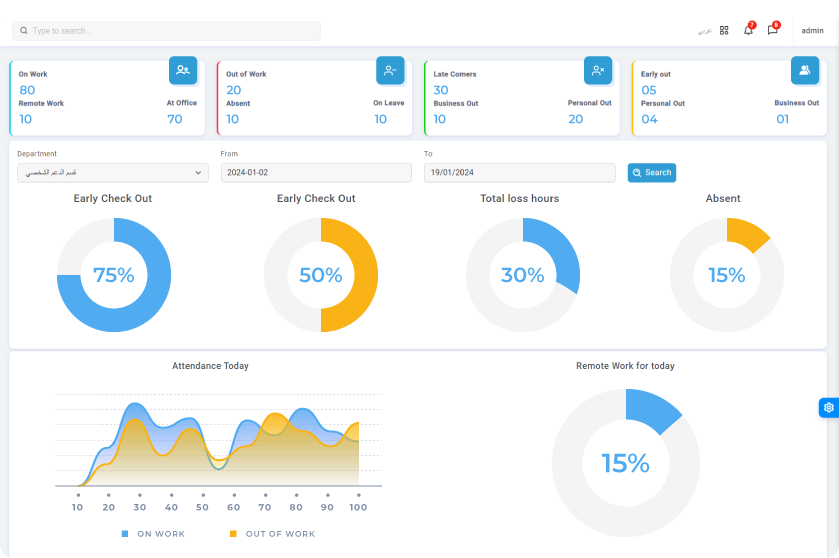
Managers and owners see a live view of present, absent, late, and on-leave employees across every location from their phone or browser. The value here is operational, not analytical. A manager who sees that 3 of 8 opening staff are absent at 8:45 a.m. can act immediately. A manager who reads that in a Monday morning report cannot.
8. Employee self-service
Employees access their own records, apply for leave, view payslips, check shift schedules, and submit requests without contacting HR. By 2025, over 80% of HR departments were expected to integrate attendance data directly into payroll according to Industry Research, and self-service portals are the primary mechanism that makes that seamless rather than a source of new inquiry volume.
Benefits of time and attendance software: beyond the obvious
The headline benefits, fewer payroll errors and less admin time, are real but well understood. The less discussed benefits are the ones that compound over time and create the most durable return on investment.
| Benefit |
Surface-level gain |
What it actually prevents |
| Payroll accuracy |
Fewer manual corrections |
Underpayment claims, overtime penalties, and audit failures that cost far more than the subscription fee |
| Labour compliance |
Overtime tracking |
FLSA, Working Time Directive, and WPS violations that carry fines and reputational damage |
| Time fraud prevention |
Eliminating buddy punching |
The cumulative payroll cost of undetected fraud, estimated at 4% to 7% of annual labour spend for businesses without automation |
| Manager visibility |
Real-time dashboards |
Reactive scheduling decisions made on stale data that cause service gaps and unplanned overtime spikes |
| Employee accountability |
Transparent records |
Attendance culture drift that worsens incrementally when tracking is inconsistent or easily disputed |
| Remote workforce management |
Mobile clock-in |
The operational blind spot of not knowing where distributed employees actually are at the start of their shift |
How time and attendance software helps businesses comply with working hours regulations
This is one of the most searched questions in the category for good reason. Labour compliance failure is not abstract. G2's payroll research reports that 53% of companies have incurred payroll-related penalties in the last 5 years, and the majority of those trace back to inaccurate or incomplete attendance records.
Here is what a properly configured time and attendance system does for compliance:
- Tracks cumulative hours per employee per week and flags when overtime thresholds approach, before they are breached
- Enforces mandatory rest periods between shifts and generates alerts if scheduling would violate them
- Maintains timestamped, tamper-proof records of every clock-in, clock-out, and break event for the full retention period required by law
- Generates compliance reports in the format required by local labour authorities, including WPS in the UAE, HMRC-compatible exports in the UK, and FLSA reports in the US
- Logs every correction and approval action with an immutable audit trail, so any dispute can be resolved with evidence rather than assertion
What compliance configuration actually requires
Buying a compliant system is not the same as being compliant. The software needs to be configured for your jurisdiction, your employee classifications, and your industry's specific overtime and rest rules. Evaluating compliance features during procurement means asking vendors to demonstrate configuration for your specific rules, not just showing you that compliance settings exist somewhere in the platform.
Related guide
Compliance starts at the schedule. If shifts are planned wrong, the attendance record is wrong from the start.
The essential guide to shift management covers how to build schedules that comply with rest period rules, reduce unplanned overtime, and give employees clear visibility over their own rosters before the week begins.
Read the shift management guide
What should you look for in time and attendance software that integrates with payroll?
Payroll integration is the feature most buyers assume is standard. In practice, the depth of integration varies enormously and the differences have large operational consequences.
A shallow integration exports a CSV at the end of the pay period that someone manually imports into payroll. A deep integration syncs in real-time, maps directly to pay codes and earning types, handles leave and overtime rules automatically, and propagates attendance corrections to payroll without requiring a separate manual action.
When evaluating payroll integration, ask these specific questions:
- Is the integration native or does it rely on a third-party middleware connector?
- How frequently does the sync occur: end of day, hourly, or real-time?
- How does the system handle mid-period corrections: do they automatically update payroll or require manual reprocessing?
- Can the integration accommodate your existing pay codes, allowances, and deduction types without custom development?
- What happens when the payroll system is temporarily unavailable: does attendance data queue or fail silently?
What features support remote and hybrid teams specifically?
Remote and hybrid work models created a gap that traditional on-premise attendance systems were not designed to fill. The cloud and mobile features that address this are not optional upgrades for distributed teams. They are the core capability requirement.
Access
Cloud accessibility
The entire system, including admin panel, employee app, and reports, works from any device without VPN or on-site infrastructure. A manager at home has the same view as one in the office.
Location
Location-based check-in
GPS geo-fencing confirms that remote employees checked in from an approved location: a home address, a client site, or a co-working space, rather than wherever they happen to be at clock-in time.
Connectivity
Offline capability
Check-ins record locally when connectivity is poor and sync automatically once the connection is restored. Essential for field staff in construction, logistics, and remote site operations.
Visibility
Shift visibility for employees
Remote employees see their schedules, shift changes, and leave balances on the app without needing to contact a supervisor, reducing the informal coordination overhead that slows distributed teams.
Integrating time and attendance systems with existing legacy systems
Legacy system integration is a real concern for organizations with established HRMS, ERP, or payroll platforms. The question is not whether modern attendance software can integrate. Most can. The question is how deep that integration actually goes.
Vendors known for secure legacy integration typically offer 3 options in ascending order of depth:
1
Flat file export
CSV or XML exports on a schedule. Simple to implement with no risk to existing systems, but requires a manual or scripted import step. Suitable for low-frequency payroll cycles where real-time sync is not critical.
2
API-based integration
REST or SOAP API calls sync data in real-time or on a defined schedule. No manual steps required, but needs IT involvement to map fields and handle authentication tokens. The standard for most enterprise deployments.
3
Pre-built connectors
Native integrations with specific HR and payroll platforms. Fastest to deploy, lowest maintenance burden. Confirm whether your existing platform is on the vendor's certified connector list before committing.
The security question most buyers forget to ask
Ask the vendor specifically about data in transit encryption, access control between systems, and how the integration handles a credentials rotation on the legacy platform. Attendance data feeding into payroll is payroll-sensitive data, and the security posture of the integration channel should match the security posture of the systems it connects.
How different industries apply time and attendance software
Healthcare
Hospitals and clinics
Manages shift rotations for clinical staff, tracks mandatory rest periods between consecutive on-call shifts, and ensures nurse-to-patient ratio compliance tied directly to schedule adherence.
Retail
Stores and outlets
Tracks part-time and casual staff across multiple outlets, feeds shift data into weekly payroll without manual consolidation, and gives store managers a live view of floor coverage versus planned schedule.
Hospitality
Hotels and restaurants
Handles split shifts, late-night timestamps, and multi-property management under 1 account. Overtime alerts before payroll runs prevent the surprise costs that erode already thin hospitality margins.
Manufacturing
Production and logistics
Monitors attendance across multiple production shifts and worksites, integrates with ERP for workforce utilization reporting, and tracks contractor hours separately from permanent staff payroll.
Corporate
Office and hybrid teams
Supports hybrid schedules and flexible work arrangements, tracks remote employee attendance through GPS check-in, and gives HR the attendance data needed for absence trend analysis and performance management.
Government and education
Public sector
Manages large fixed workforces with complex leave entitlements, generates audit trails required for public sector compliance reporting, and integrates with civil service payroll frameworks.
How to evaluate time and attendance software for your business
The standard advice, listing requirements, comparing features, and requesting a demo, is correct but incomplete. The steps that most buyers skip are the ones that prevent regret 6 months after go-live.
1
Start with your failure modes
List the 3 attendance problems costing you the most time or money each month. Use those as your primary evaluation criteria, not the vendor's feature matrix.
2
Test the edge cases, not the demos
During trial, simulate a missed punch correction, a geo-fence exception for a field employee, and a mid-month leave rule change. These stress-test the system's real operational depth.
3
Run a payroll integration test
Process 1 real payroll cycle with the integration live before committing. If the numbers reconcile without manual intervention, the integration is real. If they require adjustment, that is your answer.
4
Validate employee adoption
Ask 5 front-line employees to use the system for a week without IT support. Their friction points reveal whether the UX will sustain long-term adoption or quietly degrade data quality.
5
Check jurisdiction compliance
Ask the vendor to demonstrate overtime and rest rules configured for your specific operating region. Generic compliance marketing is not the same as your jurisdiction configured, tested, and verified.
Time and attendance systems for small businesses
Small businesses often delay adopting attendance software because they assume the cost and complexity scales with enterprise requirements. It does not. SMEs comprise nearly 46% of the time and attendance software market according to Industry Research, and around 58% of them use subscription-based cloud software at a fraction of the cost of hardware-based alternatives.
The specific requirements that differ for small businesses are:
- Per-user pricing that scales with headcount rather than requiring a large upfront license fee
- Setup measured in days, not months, with no dedicated IT implementation project required
- A mobile app that works without a separate hardware investment at each location
- Payroll integration with the platforms small businesses actually use, not only enterprise ERP systems
- Support that responds in hours, not days, because small teams cannot absorb system downtime during payroll week
What is changing in time and attendance software
The market is shifting in ways that will affect both buyer expectations and vendor capabilities over the next 3 years. These are the developments worth tracking now.
AI-driven attendance analytics
Contactless biometric authentication
ERP and HRMS unified platforms
IoT wearables and smart badges
Blockchain audit logs
Predictive absenteeism modelling
AI and machine learning in workforce analytics
AI is being integrated into attendance platforms to detect anomaly patterns: an employee who consistently checks in 3 minutes before their shift ends, or a location that shows unusually high late arrivals on Mondays. These patterns were visible in retrospective reports before. Now they surface as real-time alerts. Kings Research notes that AI and machine learning integration is enabling predictive workforce analytics, allowing businesses to address attendance issues before they become payroll problems.
Contactless biometric advances
Facial recognition accuracy has improved to the point where it is being deployed at scale in industries where fingerprint terminals were previously standard. SkyQuest reports that in April 2025, SAP SE integrated facial recognition into its SuccessFactors Time Tracking module, a signal that biometric authentication is moving from a specialist feature to a platform standard across all major vendors.
Deeper ERP and payroll integration
The separation between attendance data and the broader HR technology stack is narrowing. The ERP software market is forecast to grow at approximately 10% CAGR through 2030, and attendance systems that integrate natively with ERP platforms are commanding a measurable adoption premium, according to IMARC Group. Systems that sit as a separate data silo will lose ground to those that act as a live data layer within a unified HR stack.
Evaluate your current setup against these standards
Map the features covered in this guide against what your existing or shortlisted system actually delivers. The gaps usually make the decision straightforward.
See how raidetime addresses each one
Frequently asked questions
What is time and attendance software, and why do businesses need it beyond basic timesheets?
Time and attendance software is a digital platform that automates the tracking of employee work hours, breaks, overtime, shift schedules, leave, and payroll integration. Beyond basic timesheets, it prevents time fraud through biometric or face verification, ensures labour law compliance by tracking overtime thresholds and rest periods automatically, and gives managers real-time visibility across all locations.
The core difference is verification. A timesheet records what an employee submits. Time and attendance software records what actually happened, confirmed by location, identity, and timestamp.
What features should a time and attendance system include to support remote or hybrid teams?
For remote and hybrid teams, the non-negotiable features are: cloud-based access from any device without VPN, mobile app clock-in with GPS verification, geo-fencing to confirm location-based check-ins from approved addresses, employee self-service for leave requests and schedule visibility, and real-time reporting accessible to managers from their phone.
Offline check-in capability with automatic sync is also essential for field workers in low-connectivity areas. The system should not require employees to be at a specific physical terminal to record attendance, as that requirement defeats the purpose of a distributed workforce model.
How does time and attendance software help businesses comply with working hours regulations?
The software automatically tracks overtime hours and alerts managers before thresholds are breached. It enforces mandatory break periods between shifts, logs every work session with a timestamped and tamper-proof record, and generates audit-ready reports for labour inspections in the format required by your jurisdiction.
For UAE businesses, this includes WPS-aligned payroll exports. For UK and EU businesses, this covers Working Time Directive obligations. For US businesses, it handles FLSA overtime calculations. The key is that the system must be configured specifically for your jurisdiction's rules, as general compliance features are not the same as your jurisdiction set up and tested.
jurisdiction's setupWhat should I look for in time and attendance software that integrates with existing payroll systems?
Look for native integrations with your current payroll platform rather than CSV export workflows. The integration should sync overtime, absence, and shift data automatically without manual field mapping. Ask vendors specifically about API availability, how frequently syncs occur, and whether the system supports your payroll's existing pay codes and leave types.
The most reliable validation step is running 1 real payroll cycle through the integration during the trial period. If the numbers reconcile without manual intervention, the integration is real. If they require adjustment, you have found the gap before committing.
What are the key features of accurate employee attendance software?
The 6 features that most directly determine accuracy are: biometric or face verification at check-in to prevent proxy attendance, GPS geo-fencing to confirm physical location, real-time data sync to eliminate end-of-day batch errors, automated overtime and break calculations, an attendance regularization workflow with a full audit trail for corrections, and payroll integration that removes manual data entry between systems.
Of these, the regularization workflow is the most overlooked. Every workforce has missed punches and disputed records. How the system handles corrections determines whether attendance data stays reliable over time or slowly degrades into something nobody trusts.
Which time and attendance tools prevent payroll errors when leave rules change mid-month?
Systems with a rules engine that allows retroactive policy updates without manual recalculation are the most reliable for mid-month changes. The platform should apply updated leave accrual or deduction rules to the current period automatically, flag affected employees for manager review, and generate an impact summary before the next payroll run.
This prevents the silent propagation of errors that only surface when an employee disputes their payslip. When evaluating this specifically, ask the vendor to demonstrate a mid-period leave rule change in a sandbox environment rather than simply describing it in a feature list.